Choosing an iPad
The Apple iPad is an incredible device -- a powerful, lightweight tablet computer that can go everywhere with you. With its much larger screen, you can more comfortably do things that would be difficult on a phone. If my 14 year-old self saw this back in the 1970s, I would think the Star Ship Enterprise must also be orbiting Earth.
Although an iPad can't really replace a regular laptop or desktop computer for every use, it certainly complements one. You can do a number of things on the iPad that you previously did on your laptop or desktop and, maybe, some new things as well.
And you can do those things from a more comfortable posture seated on a sofa or plush chair rather than at your computer desk.
The iPad can integrate into your device ecosystem along with your smart phone (iPhone or Android), laptop, and desktop computer. For example, your email, contacts, and calendar can seamlessly synchronize between all these devices.
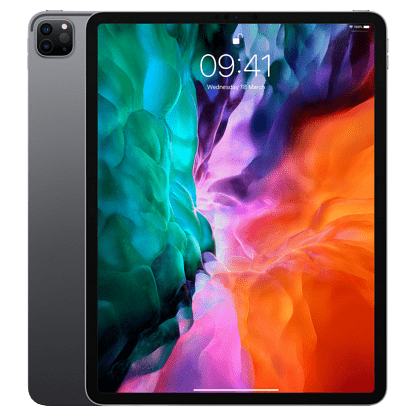
Apple iPad, 10.5 inch
On the go
By taking your iPad with you, you can access email, look at a product review while standing in a store, show your vacation pics and videos to people, make video calls using FaceTime, read a book or play a game while in a waiting room, the possibilities are endless.
You might ask why bother carrying an iPad when I have a phone that can do the same thing? That's a fair question. Maybe carrying an iPad doesn't make sense for you. Maybe you would only use an iPad at home. But even the smallest iPad has a considerably larger screen than most any phone. Unless you've got the eyes of a teenager then squinting at a comparatively tiny phone screen can be uncomfortable.
Most websites present a mobile-optimized interface when accessing via phone precisely because the screen is so small compared to a laptop or regular monitor. But on an iPad, even the Mini, websites will present a regular "desktop" interface, meaning the site will look the same as it does on a laptop or regular computer. That can mean additional website features are available and certainly you'll have a fuller view of what you're doing.
And, believe it or not, some people don't have or want a smart phone. My wife is one of those people. But she does love her iPad Mini and it goes with her everywhere.
Buying decisions
There are three important prepurchase decisions to make -- namely, the size, amount of storage, and cellular capability (or not). Size, obviously, must be decided upon before buying. But you must also decide on storage and cellular capability because neither of these specs can be upgraded later on. You'll be stuck with what you buy so choose wisely.
Note that we're discussing iPads specifically here. That's because the iPad is the runaway favorite for tablets in the US with 57% share as of this writing. Samsung's Android tablet is a very distant second at 18% so we're not covering that here.
Here we’ll discuss these specs to help you decide what’s important based on how you intend to use your iPad.
Size
Apple makes iPad in several sizes ranging from 7.9 inches (Mini) on up to 12.9 inches. Screen is measured diagonally, not counting the bezel (border/frame around the screen).
Decider: If you plan to carry your iPad everywhere, the Mini might be a good choice, as it will fit in most any hand/shoulder bag larger than a clutch. This is mainly for women*, I suspect. If it'll only be at home, then a larger iPad may be indicated.
* Alas, men in the US rarely carry any kind of bag. And that's a shame. Bags are much more common in many EU countries. I've carried a shoulder bag in the US since the 90s. It's full of the stuff I like to have with me, including a mid-sized iPad, without straining my pockets.
How much storage?
Storage refers to how much stuff your iPad will hold. The biggest storage hog, by far, is media content (videos and photos), and apps that contain lots of graphical content (games, mostly). Email uses very little or no local storage and eBooks use very little storage.
Streaming media (videos, mostly) is ephemeral. It’s viewed/listened-to in real time and not stored locally. e.g. Streamed videos don’t consume storage because you view them as they are downloaded. The frames of video you’ve already watched are simply deleted and are never stored. But any videos or photos that you shoot are stored locally.
iPad has many different storage options available. Even if you don't store a lot of media, I'd recommend at least the middle storage option. Storage cannot be added later and you may regret getting the smaller storage option if you start using it up.
Cellular capability or not?
All iPads have wi-fi capability, which means you can go online wherever there’s wi-fi available like in your home. But if you want to go online while away from home, you must find a wi-fi hotspot such as those offered in coffee shops, restaurants, etc. If you have a smartphone, you could connect your iPad to the internet using your phone as a hotspot. I don't care to do that as it's extra steps, discharges the phone battery faster, and performance can suffer.
But if you choose an iPad with cellular capability then you can go online safely and securely anywhere your wireless carrier provides service.
The incredible usefulness of the iPad really becomes apparent when you can go online wherever you are. Standing in an aisle at Home Depot and want to look something up? You can do that! My first iPad lacked cellular capability so I mostly left it at home because it was far less useful without the internet. But with my cellular-enabled iPad, I can go online practically anywhere without looking for a hotspot. That makes the iPad far more useful so I take it everywhere now.
Decider: If you are absolutely positive you’ll rarely or never need internet access away from home, then you can choose the wi-fi-only model. But if you aren’t 100% sure then you should choose a cellular-enabled model. You can always add the data plan later if you aren’t sure right now. But you cannot add the physical cellular capability later. If you choose the wi-fi-only model then later decide you want the cellular feature, then you must buy a new iPad.
What color?
What is there to say here? Just pick the color you like. If the store doesn’t have the color you want, you can order it online directly from Apple or just choose a different color. Color usually does not affect price.
A second life
Buying a late model refurbished iPad on Amazon.com or Swappa.com can save you a bundle. It's possible to find iPads in excellent condition at deep discounts from new prices. Every iPad I've ever purchased, after the first one, was a refurbished model from Amazon or another legit reseller of mobile devices. And Amazon's strong customer protection policies help ensure you won't be scammed.
Do be careful with purchasing any used mobile device. I recommend buying only from demonstrably legit companies, like those mentioned above, or from a personal friend. Be wary of buying mobile devices using person-to-person marketplaces like Craigslist or Facebook. One of things you'll want to do is check the serial number to ensure there's no carrier lock or that's not stolen.
Why? Two reasons:
1. You might not get the device at all after paying for it when using a person-to-person sales channel. That's just old-fashion fraud. Nothing new here.
2. Mobile devices, especially iPhone and iPad, have an activation lock. If the device you bought turns out to be stolen then the device's activation lock will prevent you from activating in your name, basically making the device useless. Performing a factory reset will not fix this.
Recap
So, to bring this back into the station, here's your decisions to make:
- The most important decision is the size: Small, Medium, or Large.
- Next, choose between wi-fi only or one with cellular enabled. (I recommend cellular enabled)
- Next, choose your storage option. Each model has its own options. I recommend at least 256 GB and more if you can comfortably afford it
- Finally, choose the color you like best. Color options vary by model.
Please don’t cheap-out and omit a spec or feature that you even think you might want. To paraphrase what Consumer Reports advises when buying a car: Better to spend a little extra now to get the features you want because you’ll be living with this device for several years.
Elderly computer users
I wrote an article here on the elderly and computers and how to avoid fraud. Some types of fraud, especially the tech support scammers, are less likely to affect an iPad user. iPads and iPhones are highly resistant to malware infection. Some elders also suffer from declining cognition which might make a regular computer more difficult to use. Then there's the reduced need that many elders have in what they use a computer for. For all these reasons, an iPad could make an excellent companion or even a replacement for a regular computer.
My wife's 90-something mother lives in a small village in Italy. There's no one around that's technically savvy enough to help her use or fix a problem on a regular computer. So we gave her an iPad a while ago and connected it to her wi-fi. It's been a magically transformational device for her. She reads books, the news, watches videos, and talks to my wife using FaceTime almost daily. And she can sit on her favorite chair all the while. None of that would have happened with a regular tower computer or even a laptop. The iPad is a maintenance free device that has worked perfectly for her.